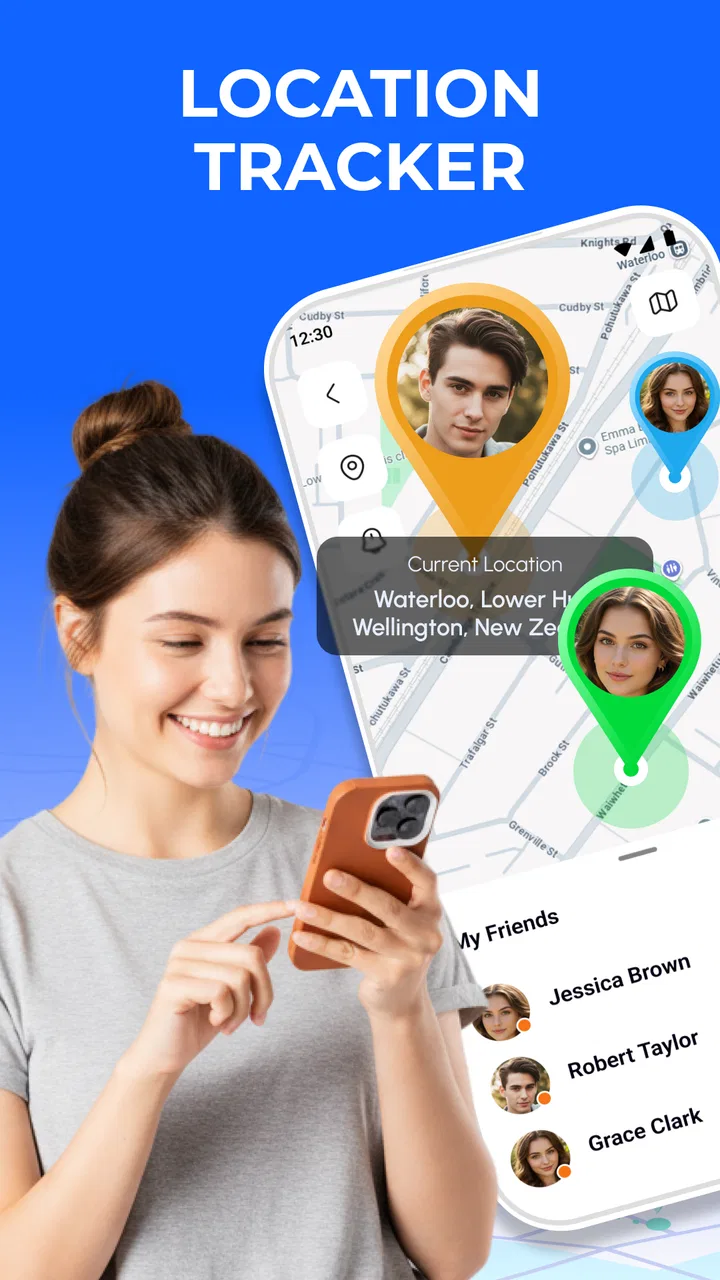
Phone Tracker Locator With GPS
- 4.1
- Rating
- 100.00K
- Installs
- Free
- Price
 Analysis by App-foxy
Phone Tracker Locator With GPS is the kind of Maps & Navigation app I would consider when the main goal is keeping track of a phone’s location without turning the experience into a complicated mapping project. I found its appeal easy to understand: it brings location viewing and alerts into one focused tool, while putting privacy close to the center of the experience. That combination makes it more practical for families, people coordinating daily travel, and anyone who wants a simple way to stay connected.
The app is developed by Avn Global Application and is available free of charge. It has reached over one hundred thousand installs and holds a 4.5 average from more than three hundred ratings, which gives it a useful level of real-world visibility without making it feel like an anonymous experiment. Its Everyone age rating also makes the intended audience broad. The current version is 1.2.0_07052026, and it runs on Android 7.0 or later.
How I use it for everyday location checks
My preferred way to use a phone-tracking app is to give it a clear job before I start changing settings. With Phone Tracker Locator With GPS, that job is usually checking where a connected phone is, watching for a meaningful change, and using an alert instead of repeatedly opening a map. That last point matters more than it sounds. Constantly checking a location is tiring, while a relevant notification can fit naturally into a busy day.
You May Also Like

 Blood Strike: 2.5 Anniversary
Blood Strike’s Loadouts Turn Every Drop Into a Tactical Gamble
A close look at Blood Strike’s custom loadouts: how fast access to signature weapons reshapes its battle royale rhythm, rewards preparation, and narrows the gap between fights.

 Pandora - Music & Podcasts
Pandora’s Music Is Easy to Start, but Harder to Recover
Pandora’s strength is its low-effort path from a seed to a station. Its weak spot is how much confidence it asks you to place in connection, setup, and quiet recovery.

 8 Ball Pool
 Is Built on Rivalries, Rematches, and Routine
A close look at the rivalries, rematches, shared routines, and unanswered safety questions that turn a quick pool match into a persistent mobile community.

 Samsung Music
’s Quiet Strength Is Playing What You Already Own
Its reach comes less from spectacle than from dependable access to a personal library. That simplicity is both the app’s strongest retention engine and its ceiling.

 AccuWeather: Weather Radar
AccuWeather Review: A Quick, Clear Forecast for Everyday Decisions
For everyday plans, the best forecast is the one you can understand quickly. AccuWeather makes rain timing, radar, and local conditions easy to act on, with a few trade-offs.

 Hill Climb Racing
Why Hill Climb Racing Still Turns Crashes Into One More Run
A tiny car, a bumpy hill and one more upgrade: Hill Climb Racing keeps resurfacing because its simple chaos makes every near-miss feel personal.
More From Our News Desk



A realistic example would be coordinating with a family member who is traveling home. Rather than sending several messages asking where they are, I would use the location view for a quick check and rely on a smart alert when the situation changes. The app is also suitable for a parent who wants a straightforward way to stay connected with a child, provided everyone involved understands the arrangement and agrees to it.
I would begin by setting up the people and phones that genuinely need to be connected. Keeping the circle small is a useful habit: it reduces confusion, makes alerts easier to interpret, and avoids turning a private tool into a general-purpose surveillance dashboard. I would also explain to the other person what the app is being used for. Location sharing works better when it is based on trust rather than surprise.
The map itself is only one part of the workflow. The more useful routine is to decide what question I am trying to answer. If I only need to know whether someone has arrived, an alert is more efficient than watching a moving marker. If I need to understand where they are right now, the live location view is more appropriate. Separating those two needs prevents unnecessary checking and makes the app feel calmer.
The best starting habit is to use location information for a specific decision, not for endless monitoring. That approach also helps with privacy. A location tool becomes much easier to manage when I know when I need it, who should see it, and what action I will take from the information.
What the first setup should accomplish
During the initial setup, I would avoid enabling every possible alert immediately. Instead, I would test the basic location workflow first and confirm that the connected phone appears as expected. Then I would introduce alerts one at a time. This makes it easier to identify which notification is useful and which one creates noise.
I would also perform a short test before relying on the app during an important journey. For example, I might check the location from another room or during a normal trip across town, then compare what I see with the other person’s actual situation. This is not about measuring accuracy with scientific precision; it is about learning how the app behaves in the routine I care about.
Another practical step is agreeing on a backup communication method. A tracker should support communication, not replace it. If a phone loses power, loses connectivity, or is left somewhere, a normal call or message may still be the fastest solution. I would treat Phone Tracker Locator With GPS as one layer in a plan rather than the only way to find someone.
Settings that deserve attention
The privacy controls deserve more thought than the map colors or visual details. Because location is sensitive, I would review who can see it, when sharing is active, and whether the selected alerts match the relationship involved. A location-sharing arrangement that makes sense for a child on the way home may not make sense for an adult colleague or a casual contact.
I would also check notification behavior early. Smart alerts are useful only when they arrive at the right moments. If alerts are too frequent, I would narrow the situations that trigger them rather than simply ignoring notifications. If they are too quiet, I would review the phone’s notification settings as well as the app’s own choices. The goal is a signal I notice, not a stream of interruptions.
Battery behavior is another reason to be thoughtful. Any service that depends on location can affect how a phone is used, even when the effect is not obvious during a short test. I would avoid leaving unnecessary tracking arrangements active and would pay attention to whether the phone is being used heavily for navigation, video, or other demanding tasks at the same time. This is a sensible trade-off: more frequent location awareness can be convenient, but it should have a clear purpose.
Privacy is not just a setting I would configure once. I would revisit it when a relationship, trip, or household routine changes. Removing an old connection is just as important as adding a new one. Experienced users tend to treat the connected list as something to maintain, not a permanent record of everyone who has ever needed a location check.
The app is free to download and use as its basic product, but in-app purchases range from $5.99 to $49.99 per item. I would therefore inspect any upgrade screen carefully before committing. The price range is wide enough that a user should understand exactly what an optional purchase changes and whether that change solves a real problem. For occasional location checks, the free experience may be sufficient; for heavier use, the value depends on the specific tools offered at the point of purchase.
Repeatable shortcuts for faster use
The fastest workflow I found is based on preparation rather than frantic checking. I would keep the app in an easy-to-reach place on the phone, make sure the relevant notifications are not buried, and use a consistent routine for common situations. For a school pickup, for example, I would check the location at the expected time and use an alert for arrival rather than reopening the app every few minutes.
Another useful pattern is to create a simple distinction between “where is the phone?” and “has the person reached the destination?” Those are different questions. The first calls for the location screen. The second calls for an alert or a direct message. Using the right tool for the question saves time and reduces the temptation to interpret every small movement on the map.
For travel, I would check the app before leaving, during a meaningful delay, and near the expected arrival point. That rhythm is more manageable than watching continuously. It also provides better context: a single location snapshot can be misleading, while a few checks connected to a known itinerary are easier to understand.
Households can benefit from agreeing on names and routines for connected phones. A clear label makes it easier to avoid checking the wrong device, especially when several family members are involved. I would also establish what an alert means in practice. An arrival notification might mean “the person is probably there,” not necessarily “they are inside the building and ready to answer.” That small distinction prevents false certainty.
For users who regularly help an older relative, the app may be most useful when combined with a scheduled check-in habit. The location provides context, while a phone call confirms wellbeing. If the location has not changed when expected, I would contact the person before drawing conclusions. A stationary phone may indicate a normal pause, a forgotten device, or a technical issue; the map alone cannot explain every situation.
Where the app is strong, and where it needs caution
Its strongest quality is focus. Phone Tracker Locator With GPS is not trying to be a full navigation suite, a social network, or a travel planner. For someone who wants location visibility, alerts, and privacy-oriented control in one place, that narrower purpose is easier to understand than a large app packed with unrelated features.
I also like the way alerts can change the workflow from reactive to planned. Instead of repeatedly asking for updates, I can set up a routine around a meaningful event and let the app provide a prompt. That is especially helpful for family logistics, where the real problem is often coordination rather than finding an address.
The main friction is that location tracking is never completely automatic in the human sense. The people involved must understand the arrangement, the phones must remain usable, and alerts must be configured sensibly. A user expecting a tracker to solve every lost-phone or missed-appointment problem may be disappointed. It is a coordination tool, not a guarantee that a person or device can always be found.
I would also be careful about treating a displayed location as perfectly precise in every situation. Maps can show where a phone appears to be, but they do not reveal who is holding it, whether the person is safe, or why the device has stopped moving. That is why I see direct communication as an important companion to the app, especially in urgent or ambiguous situations.
People who already use a broader ecosystem with built-in family location features may prefer staying there. A built-in option can feel more convenient when everyone already uses the same platform and does not want another app to manage. On the other hand, someone looking for a dedicated tracker with a clear focus may appreciate the separation offered here.
This app is not the right choice for someone who wants turn-by-turn driving directions, public-transit planning, detailed route recording, or a complete travel map. In those cases, a conventional navigation app is the better tool. Phone Tracker Locator With GPS makes more sense when the central question is about connected people and devices rather than the best route between two places.
Advanced limits experienced users should understand
The most important advanced lesson is to avoid confusing more tracking with better tracking. Adding every alert and checking every movement may create a large amount of information without improving decisions. I would start with the smallest useful setup, observe how it fits daily life, and change only the part that causes a real problem.
There is also a social limit. Location sharing can become uncomfortable if one person feels watched rather than supported. Clear consent and an agreed purpose are not optional extras in my view. They are what make the feature useful. If someone does not want to participate, I would not treat the app as a way around that choice.
Another limit is interpretation. A phone can be left in a car, handed to another person, or separated from its owner. A location alert can tell me that a device reached an area, but it cannot confirm every detail of the situation. I would use the app to decide whether a follow-up is sensible, not as a substitute for judgment.
Users should also remember that a tracker is only as dependable as the routine around it. If people regularly disable notifications, forget to charge their phones, or leave the device behind, the app will appear less useful even though the underlying idea is sound. A short household agreement about charging, notification visibility, and when to contact one another can improve the experience more than repeatedly changing map settings.
The current version, 1.2.0_07052026, is compatible with Android 7.0 and newer devices. That broad compatibility is helpful for households with older phones, although I would still test the app on each device that matters before making it part of an important safety routine. Different phones can behave differently around background activity and notifications, so a real test is more valuable than assuming every handset will respond identically.
My verdict after building a routine around it
I see Phone Tracker Locator With GPS as a practical choice for people who want a dedicated way to stay connected through location checks and smart alerts. Its value is not in showing a map for the sake of it. The value comes from creating a repeatable routine: decide who should be connected, choose the alert that answers a real question, check privacy regularly, and keep another communication method available.
The app is particularly well suited to families, caregivers, and small groups coordinating ordinary travel. It can reduce unnecessary messages and make arrival routines easier to manage. It is less suitable for users seeking a full navigation replacement, detailed trip analysis, or a tool that can explain everything happening around a phone.
I would recommend trying the basic workflow before considering an in-app purchase. Since individual items cost between $5.99 and $49.99, the sensible approach is to identify a specific need first and then decide whether an optional feature is worth paying for. Paying for more alerts or controls only makes sense when the free setup has already shown that the app fits the way you live.
Overall, I find it most convincing when used with restraint. Set it up for a clear purpose, keep the connected circle tidy, and let alerts handle predictable moments. For everyday location coordination, Phone Tracker Locator With GPS is a focused and approachable option, as long as you treat privacy, communication, and the limits of phone-based location as part of the workflow.
FAQs for Phone Tracker Locator With GPS
01How does Phone Tracker Locator With GPS ensure user privacy?
Phone Tracker Locator With GPS prioritizes user privacy by implementing strict encryption protocols and requiring user consent for location sharing. The app does not store location data on external servers and allows users to control who can view their location, ensuring that personal data remains secure and private.
02Can Phone Tracker Locator With GPS be used without an internet connection?
While Phone Tracker Locator With GPS primarily relies on an internet connection to provide real-time updates and location sharing, it can still function in offline mode using GPS. However, features like live tracking and sharing will be limited until the device reconnects to the internet.
03Is Phone Tracker Locator With GPS compatible with both Android and iOS devices?
Yes, Phone Tracker Locator With GPS is designed to be compatible with both Android and iOS devices. Users can download the app from the Google Play Store or Apple App Store and enjoy a seamless experience across different platforms, ensuring broad accessibility and functionality.
04What features does Phone Tracker Locator With GPS offer?
Phone Tracker Locator With GPS offers a variety of features including real-time location tracking, geofencing alerts, location history, and emergency SOS signals. It is designed to keep users connected and informed about the whereabouts of family and friends, making it a versatile tool for safety and coordination.
05Does Phone Tracker Locator With GPS consume a lot of battery?
Phone Tracker Locator With GPS is optimized to minimize battery consumption. It uses advanced technology to efficiently track locations without significantly draining the battery. However, like any GPS-based app, prolonged use may affect battery life, so users should consider this when using the app extensively.
Pros
- Accurate real-time tracking capabilities.
- User-friendly interface for easy navigation.
- Customizable alerts for location changes.
- Low battery consumption during operation.
- Supports multiple devices simultaneously.
Cons
- Requires internet connection for accuracy.
- Limited features in free version.
- Privacy concerns with data sharing.
- In-app ads can be intrusive.
- Occasional GPS signal loss.

Phone Tracker Locator With GPS
Gallery